
Ask an AI assistant to email a 1 MB PDF through most MCP email connectors, and this is what you're really asking for: about 1.28 million tokens of output, written one token at a time, in a code nobody can read, without a single mistake. That's what I measured on Claude Sonnet 5 on 28 September 2026. One reply from that model is capped at 128K output tokens, so the attachment alone is ten replies long before the email has a word in it.
That's the hidden problem with MCP email attachments, and it explains why so many AI email integrations refuse attachments, cap them at a few kilobytes, or quietly send the message without the file. A bigger model won't fix it and neither will a higher limit. It's an architecture decision, and it fits in one sentence: the AI should decide what needs to happen, and the email service should move the bytes.
Below is the cost, measured rather than guessed, in both directions, and how a connector built the other way round handles it. The worked example is Mailbox MCP, which we build; the measurements and the script behind them work on any connector.
Disclosure, before you read further
This article uses Mailbox MCP as its example of attachment handling done by reference. We build and sell it. 365i publishes this site and I build that product. Where I make a claim about other connectors, it links to that vendor's own page. Where I make one about ours, it comes from the product's own source code or from a test I ran, and the text says which.
What base64 does to MCP email attachments in an AI conversation
Email can only carry text. So every attachment you've ever sent travelled as base64: the file's bytes rewritten with 64 safe characters, four characters for every three bytes, broken into lines of at most 76 characters under the rule in RFC 2045. Your mail program does it in a blink. I checked one in our own sales mailbox this morning: a one-page PDF receipt of 49,230 bytes sits inside its email as 67,368 characters. That's a ratio of 1.368, which is exactly four-thirds with the line breaks added.
None of that matters while a program does the encoding. It matters the moment a connector hands the job to the model. In the Model Context Protocol, a tool call is a small JSON object the model writes itself: a tool name and its arguments. If a connector's send tool takes the attachment as a base64 string (Google's own Gmail MCP server marks that field "Required. The base64-encoded content of the attachment"), then the model has to produce the whole file, character by character, as part of its reply. Every PDF begins JVBERi0, which is %PDF- in base64, and your assistant would have to type a million-odd characters of that, perfectly. Forwarding an invoice is worse: the model reads it in as base64 and writes it straight back out, paying for the same bytes twice.
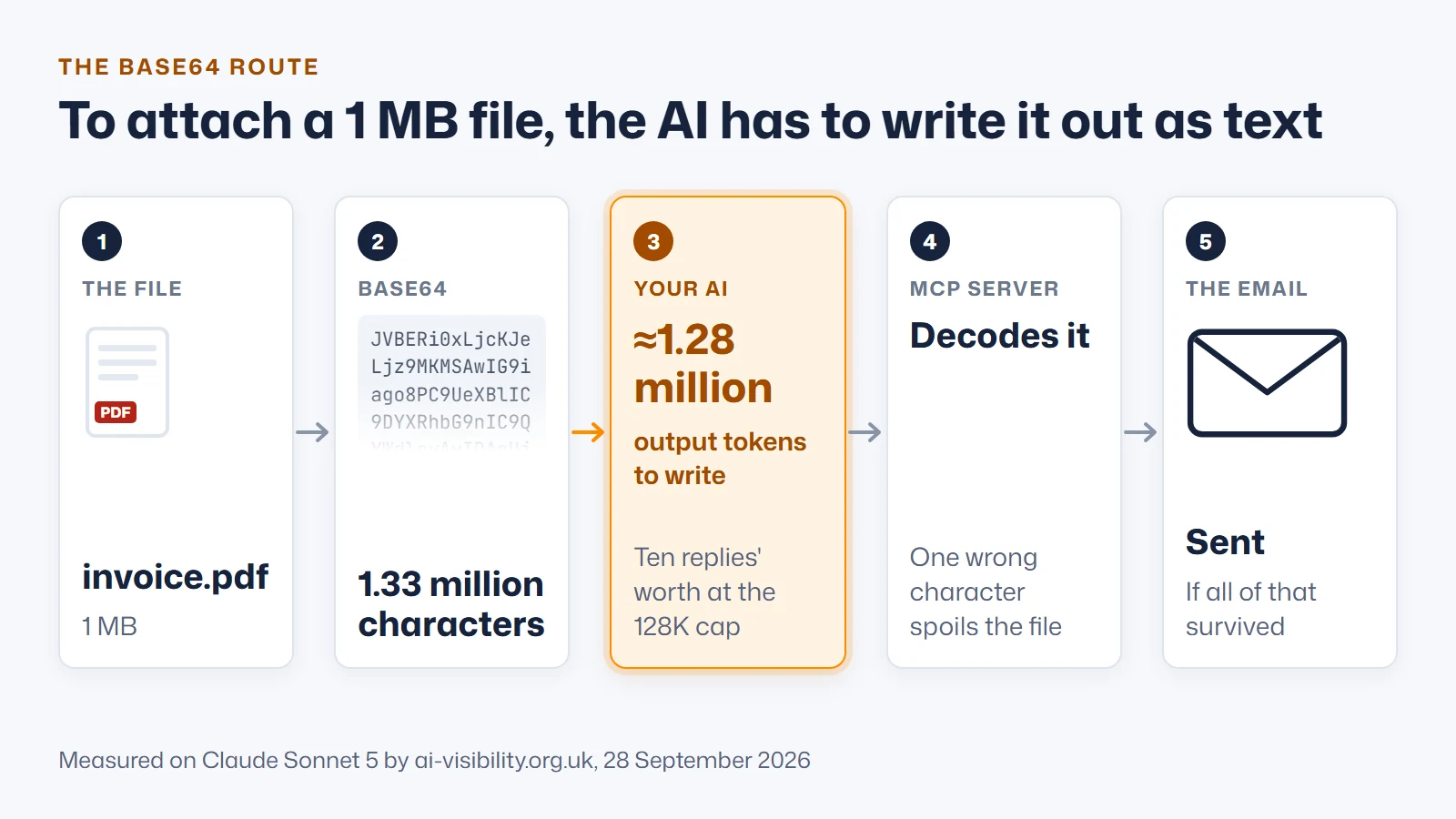
Base64 token usage, measured on Claude and OpenAI tokenisers
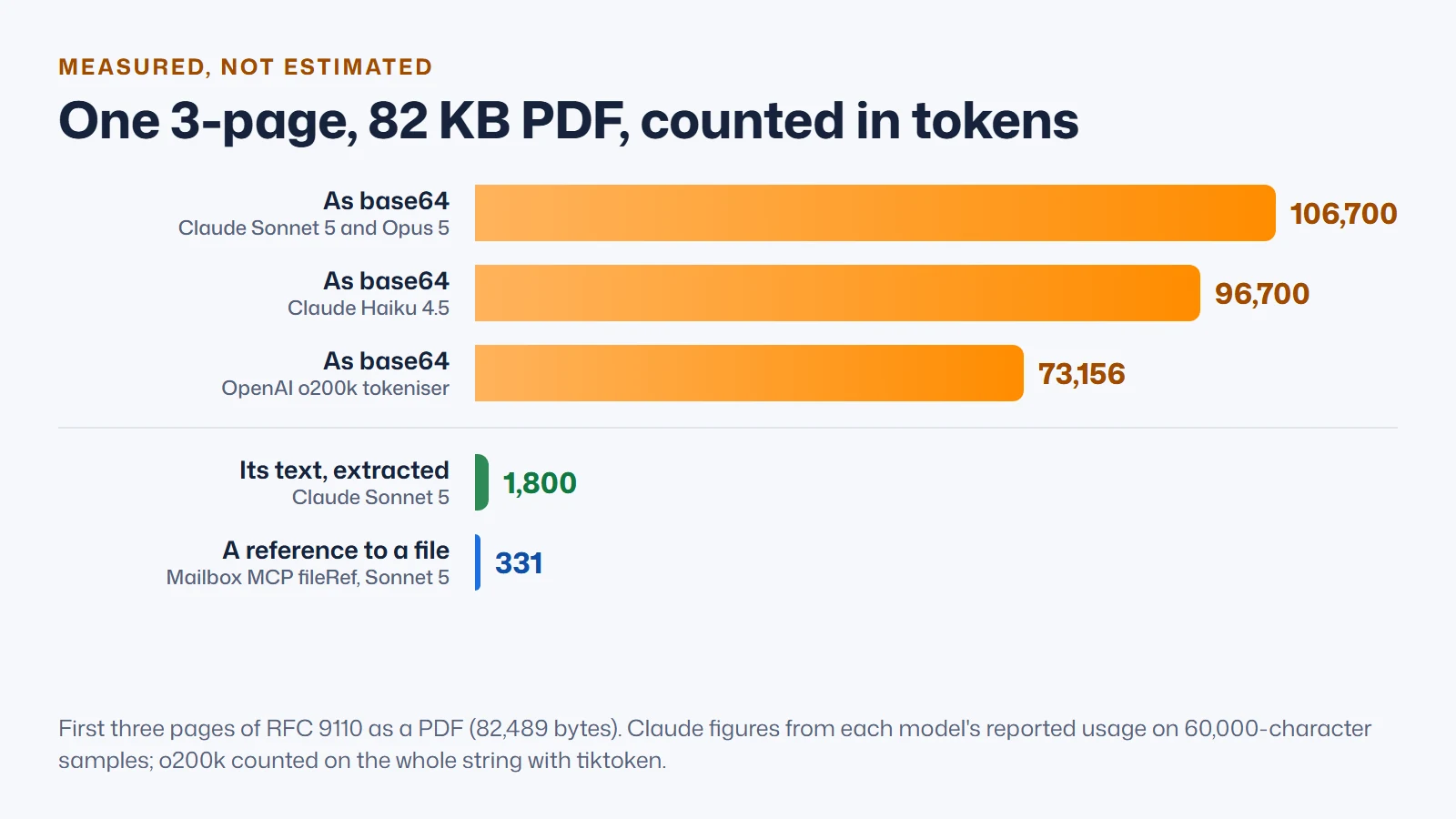
The usual rule of thumb is that a token is three or four characters. That holds for English. It doesn't hold for base64, and no model vendor publishes a figure for it, so I measured it on 28 September 2026.
I base64-encoded three real files (the first three pages of RFC 9110 as a PDF, the whole 194-page RFC at 2.86 MB, and a 134 KB JPEG) and counted each two ways: OpenAI's o200k_base encoding in its tiktoken library on the whole string, and, for Claude, the input tokens each model reported through Claude Code for 60,000-character windows, with the baseline subtracted.
| File | Size | Base64 characters | OpenAI o200k | Claude Haiku 4.5 | Claude Sonnet 5 and Opus 5 |
|---|---|---|---|---|---|
| RFC 9110, first 3 pages (PDF) | 82,489 bytes | 109,988 | 73,156 | ≈96,700 | ≈106,700 |
| Photo (JPEG) | 133,822 bytes | 178,432 | 120,749 | ≈153,700 | ≈168,700 |
| RFC 9110, all 194 pages (PDF) | 2,858,365 bytes | 3,811,156 | 2,561,380 | ≈3.35 million | ≈3.70 million |
| Any 1 MB file (calculated) | 1,000,000 bytes | 1,333,336 | ≈896,000 | ≈1.16 million | ≈1.28 million |
| Characters per token | 1.49 | 1.14 to 1.16 | 1.03 to 1.06 |
Base64 comes out at about 1.5 characters per token on OpenAI's encoding, about 1.15 on Claude Haiku 4.5, and a shade over 1 on Claude Sonnet 5 and Opus 5, which returned identical counts and clearly share a tokeniser. Current Claude models spend roughly one token per character. Tokenisers learn their vocabulary from ordinary text, and a run like Lj9MKMSAwIG9iago matches almost nothing they've seen, so it breaks into tiny pieces.
One correction of our own belongs here. Mailbox MCP's documentation and its tool descriptions have said "roughly 450,000 tokens per megabyte", which came from the three-characters-per-token rule. On Claude the measured cost is nearly three times that. To check your own files, this is the OpenAI half of the method, and it runs as it stands:
import base64, pathlib, tiktoken

data = pathlib.Path("invoice.pdf").read_bytes()
b64 = base64.b64encode(data).decode()
tokens = len(tiktoken.get_encoding("o200k_base").encode(b64))

print(f"{len(data):,} bytes -> {len(b64):,} base64 characters -> {tokens:,} tokens")
print(f"{tokens / len(data):.2f} tokens per byte of file")
Why output limits, not price, break AI email attachments
Cost is the obvious objection, and at API prices it's real. Anthropic lists Claude Sonnet 5 at $2 per million input tokens and $10 per million output, so one 1 MB attachment typed out as base64 is about $12.80 of output. On a subscription you pay in usage limits instead. Price still isn't what breaks it, though. Three other things give way first.
Output is capped per reply. Anthropic's model table gives a 128K output limit for Opus 5.5 and Sonnet 5, and 64K for Haiku 4.5. At the rate I measured, the largest file one Sonnet 5 reply could encode is about 100 KB, and only if it wrote nothing else. Output is slow. Artificial Analysis currently measures Claude Opus 5.5 at roughly 80 to 100 output tokens a second, so even at a generous 100, a 1 MB file is three and a half hours of typing. Output is unforgiving. Base64 carries no error correction. One wrong character spoils the bytes it encodes, and a string cut short is either refused by the server or, worse, accepted as a broken file.
The failure you actually see is quieter than any of that. On 30 August 2026, testing an early build of our own connector in ChatGPT, I asked it to make an image and email it to me. It tried twice to attach the picture as base64 and was refused both times. Then it sent the email without it. The message arrived, and nothing in it hinted that a picture was meant to be there.
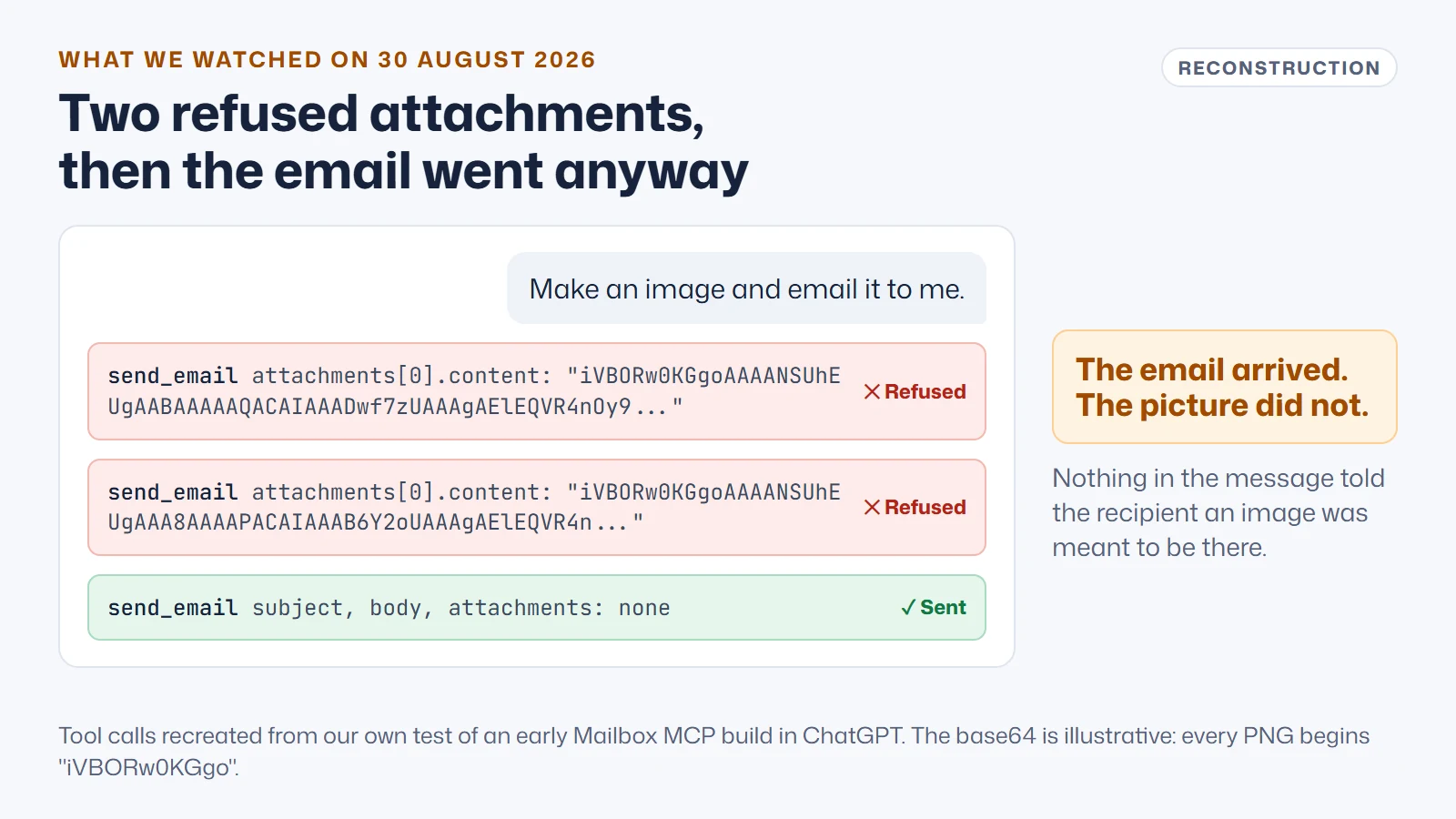
That test is why Mailbox MCP's attachments work the way they do now. The design was at fault, not the model: it asked a language model to be a file transfer program.
Dictation or a collection address: how MCP file attachments should work
Picture asking an assistant to post a signed contract to a client. One assistant rings the post room and reads the contract out, character by character, in a code only the post room's machine understands, while someone at the other end types it back in. The other says: "It's in the blue folder on my desk. Please send it to Sam." Both get a contract posted. You'd only let one of them near a telephone again.
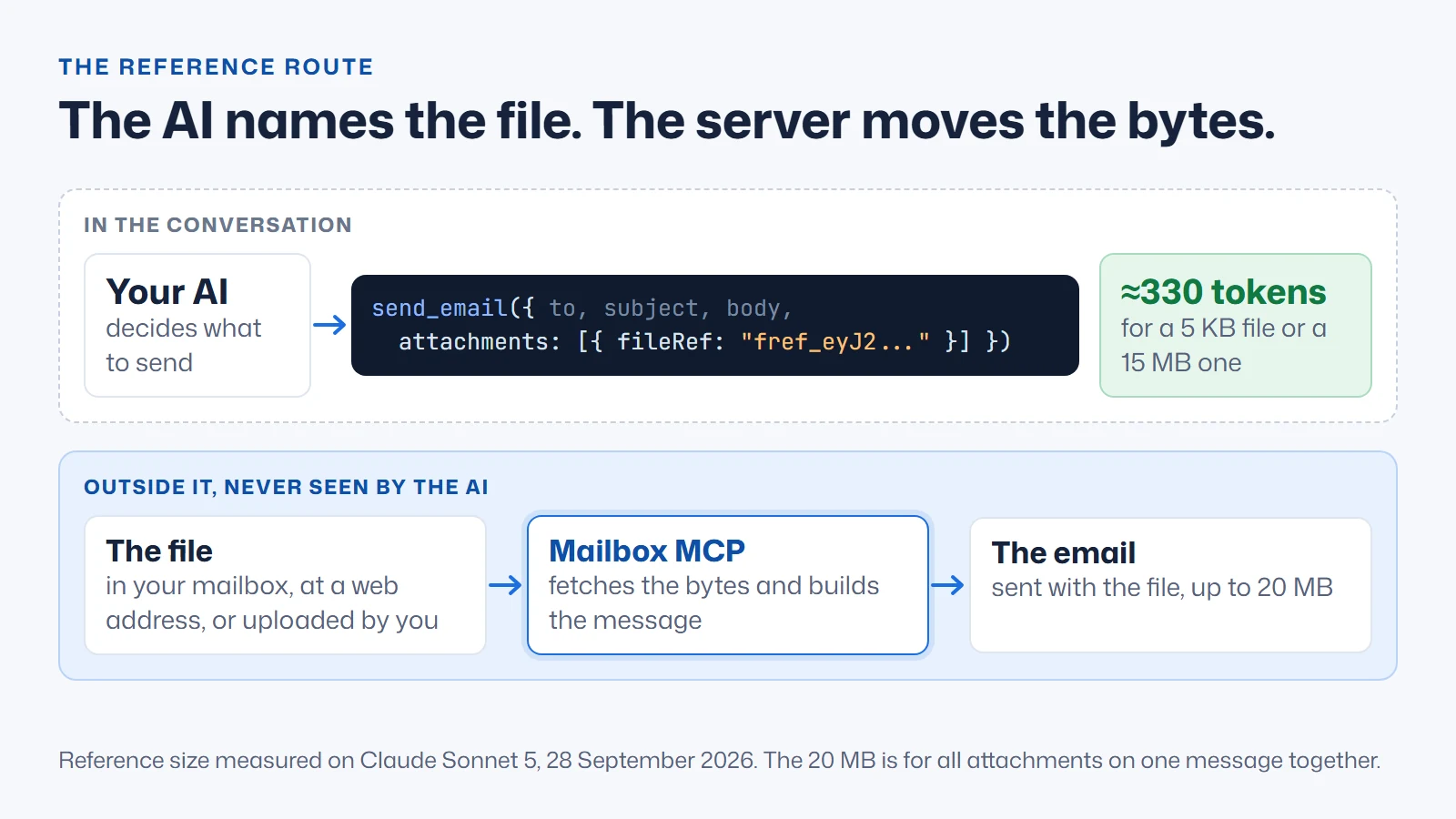
Programmers call the difference pass-by-value and pass-by-reference. In the second version the AI still makes every decision that matters: which file, to whom, with what covering note, and whether to send it at all. It just stops carrying the file. The server that already has access to the mailbox, or can reach the web, fetches the bytes itself while it builds the message, and the conversation only ever holds a short handle. That's the whole of good MCP attachment handling, and it applies to AI agent file attachments of every kind, not only email.
Google reached the same conclusion building its own agent framework. Hangfei Lin, tech lead on Google's Agent Development Kit, describes how ADK treats large data as named artifacts that an agent sees only as a lightweight reference until it actually needs the contents:
"Conceptually, ADK applies a handle pattern to large data. Large data lives in the artifact store, not the prompt."
Hangfei Lin, Tech Lead, Google, in Architecting efficient context-aware multi-agent framework for production, Google Developers Blog, 4 December 2025 (verify quote at source)
Reading that was a relief, if I'm honest. For weeks I'd been arguing this from one connector and one embarrassing test, and here was a team at Google describing the same move for spreadsheets, JSON and transcripts, with a proper name on it. What I notice in the wording is "not the prompt". Lin doesn't say "less of it in the prompt" or "compress it first". The data has no business being there at all. An email attachment is the purest case of that I can think of, because the model never needed the bytes. It needed to know which file, and whether it was the right one.
The model platforms work the same way underneath: Anthropic's Files API says "upload files once, reference them by file_id", and OpenAI's file inputs take a file_id or a URL.
How to send attachments with Claude or ChatGPT: four routes in
Mailbox MCP's send, reply, forward and draft tools all take attachments through one parameter with four ways in, and only the last one costs the conversation anything. Here's the difference in the tool call itself, first the base64 shape and then the reference shape:
// The base64 route: the model writes every byte
{ "attachments": [ { "filename": "invoice.pdf",
    "content": "JVBERi0xLjcKJeLjz9MKMSAwIG9iago8PC9UeXBlIC9DYXRhbG9n..." } ] }

// The reference route: the model names the file
{ "attachments": [ { "fileRef": "fref_eyJ2IjoxLCJtIjoiODNhMGM5ZmEtNzI1ZS00..." } ] }
For a 1 MB file the first string runs to 1.33 million characters. The second is the whole of it.
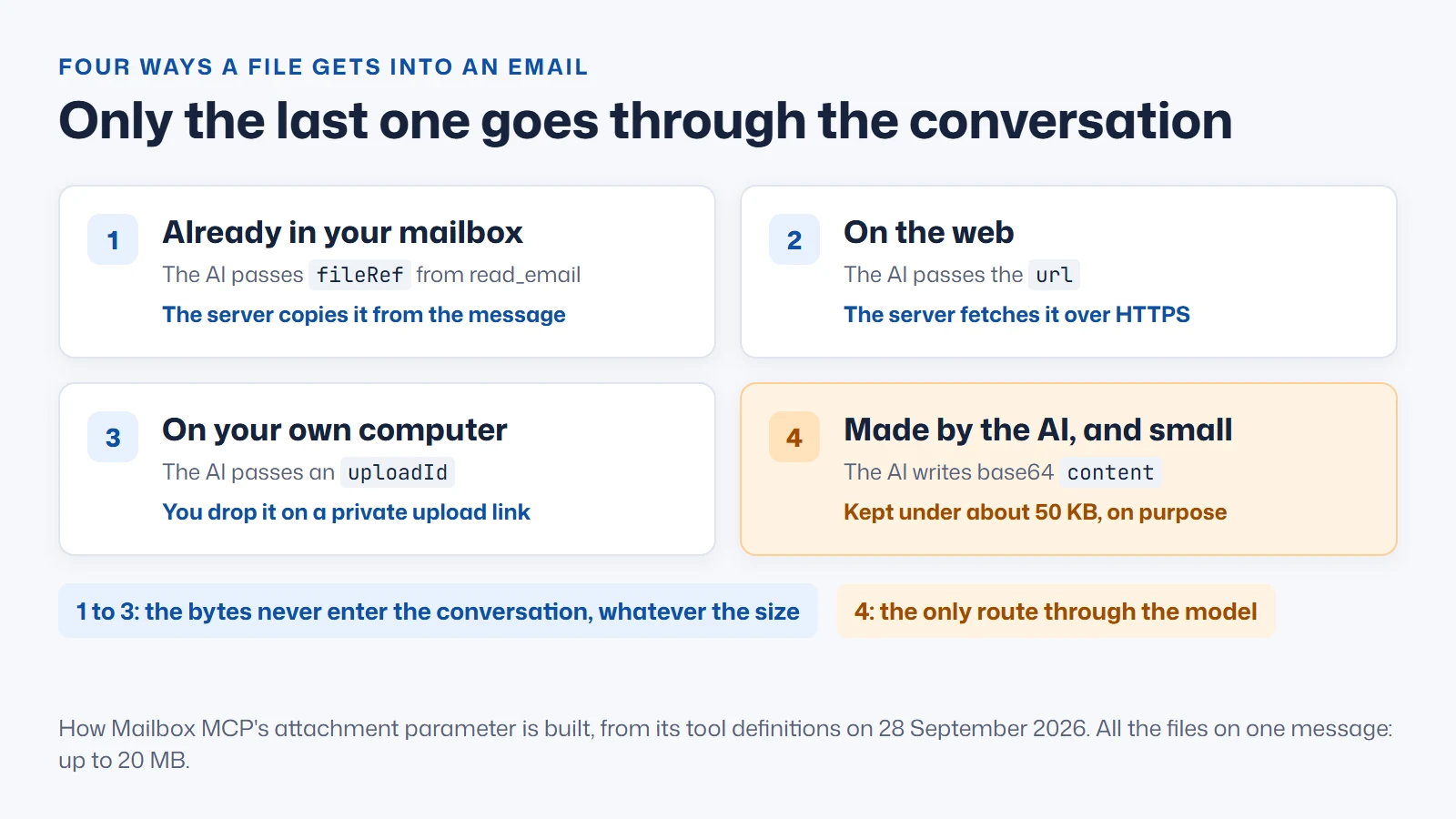
- A file already in the mailbox.
read_emaillists each attachment with aref, and the AI passes that back asfileRef. The server copies the bytes from the original message while it builds the new one. References can't be written by hand or guessed, and they stop working after an hour, so an old conversation simply reads the message again for a fresh one. - A file on the web. The AI passes an https link as
urland the server fetches it, with the fetch guarded: HTTPS only, public addresses only, every redirect re-checked, and a byte cap. - A file on your own computer.
create_upload_linkmakes a private one-off link. You drop files on it, they wait in your own Drafts folder rather than on our servers, and oneuploadIdattaches them all. Claude Code can upload the file itself; hosted sandboxes usually have no network, so in claude.ai or ChatGPT the link goes to you. - A small file the AI made itself. Base64
content, under about 50 KB, which the tool calls "a ceiling, not a target". Invalid base64 is refused rather than sent as a corrupt attachment.
All the files on one message can come to 20 MB, and when a mail server sets a lower limit the send is refused before it goes, with the server's figure named. That refusal matters more than the limit, because an email that goes out without its file is the failure worth designing against. The public write-up of all this, with the prompts people actually use, is how Mailbox MCP handles AI email attachments; how the connector works covers the rest of the architecture, and the full Mailbox MCP tool list names every one of its 32 email tools with its safety class.
One detail from building it surprised me: the order of options in the tool's schema matters. For about a week content was listed first, and a model reads a tool description top to bottom and reaches for the first thing that fits. So fileRef now leads, as "the usual way to attach a file", and content states its own cost in tokens. If you design MCP tools, that's the cheapest fix in this article.
It works the same in Claude, ChatGPT, Cursor and the other supported Mailbox MCP integrations, on any mailbox; connecting Gmail to Mailbox MCP takes an app password. A calendar invitation is a few kilobytes and fine as base64, though with a calendar connected the AI can book the meeting directly and skip the file.
Inbound attachments: reading a file without swallowing it
Receiving is the mirror image. A connector can hand an attachment to the model as base64 in a tool result. That's input, so it's cheaper than typing it out, but it fills the context window and is mostly useless once there. A PDF isn't text even after decoding: its page contents are normally compressed (Adobe's PDF tools apply Flate compression by default), so a model "reading" a PDF's base64 is looking at what amounts to a zip file. Services that show a model a PDF decode and parse it first. Claude Code warns at 10,000 tokens of tool output and moves anything past 25,000 out to a file by default. At the rate I measured, that's about 19 KB of attachment. As Anthropic's guidance puts it, context "must be treated as a finite resource with diminishing marginal returns".
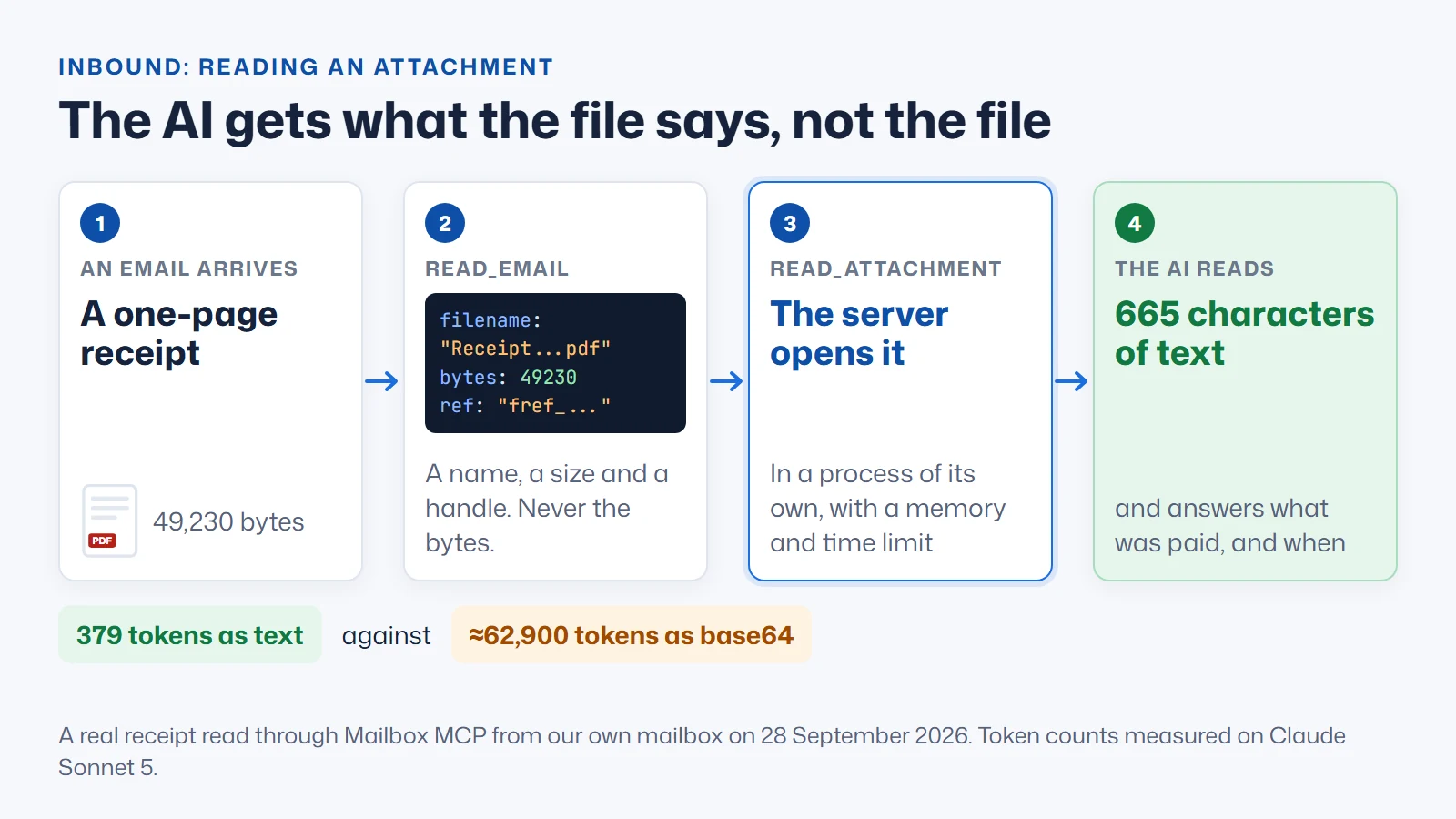
So the model should get what the file says, not the file. In Mailbox MCP, read_email lists each attachment's name, type, size and ref and never opens it. read_attachment takes the refs, opens each file in a process of its own with a memory ceiling and a 20-second limit, and returns text: PDFs page by page, Word documents, spreadsheets with their formulas worked out, slide decks.
I tried it on the receipt from earlier. The 49,230-byte PDF came back as 665 characters of text, which Claude Sonnet 5 counted as 379 tokens. Sent in as base64 instead, the same file would be about 62,900 tokens, roughly 166 times as many, to learn one figure and a date.
There's one place base64 still travels, and it sharpens the whole argument rather than weakening it. A scanned page or a photographed receipt comes back from read_attachment as an image, and an MCP image result is base64 on the wire. That's fine, because the host decodes it and shows the model a picture: in Claude Code's words, when a tool returns an image "Claude sees the image inline in the conversation", and it's counted as an image rather than as a million characters. Base64 on the wire costs nothing. Base64 in the model's own tokens is the problem.
Reading has a second risk that has nothing to do with size: a PDF is as good a place to hide "ignore your instructions" as an email body. Mailbox MCP fences file text as untrusted and flags instruction-shaped content anywhere in the file; the Mailbox MCP threat model covers how, and the security model covers what's held. For the file itself, each attachment carries a private download link that lasts fifteen minutes.
What the MCP specification says about file attachments
The protocol knows about all this. Since its 2025-06-18 revision, the MCP specification has let a tool return a resource_link, which it describes this way: "A tool MAY return links to Resources, to provide additional context or data." That's a URI the client can fetch instead of the contents themselves, and it covers the direction from server to model. The other direction, a file going into a tool, has no standard at all yet. Tool arguments are arbitrary JSON, so every server invents its own convention.
The MCP project says so itself. The charter of its File Uploads Working Group, led by Den Delimarsky of Anthropic, starts with the problem:
"Today, servers that need a file from the user resort to prose instructions asking for base64 strings or local paths, which produces inconsistent UX and pushes encoding details onto end users."
MCP File Uploads Working Group, File Uploads Charter, modelcontextprotocol.io (verify quote at source)
I laughed out loud at "pushes encoding details onto end users", because it's such a polite description of an email that went out without its picture. The end user in that sentence isn't a developer. It's whoever was waiting for the file. What I like about the charter is that it treats this as a failure people feel rather than an efficiency problem. Tokens are the cost you can measure. The cost you can't is a person who has no way of knowing whether their assistant attached the thing.
A draft proposal, SEP-2631: File Objects and Transfer by Casey Chow, would add out-of-band upload and download to the protocol, keeping bytes out of the JSON-RPC messages. Its motivation section names the same habit: "Inline base64 becomes the de facto fallback, even for large or sensitive files." It's still a draft. Until something like it lands, a connector has to build its own reference routes, which is what the four routes above are; if a standard ships, only the handshake changes, and the recent Mailbox MCP changes are where you'd see us adopt it.
Which AI email MCP servers avoid base64 attachments?
This is a table of what each vendor publishes about how a file gets into an email, not a test of their products. Every row links to the page it came from, read on 28 September 2026.
| Connector | How a file gets in | Does the AI carry the bytes? |
|---|---|---|
| Google's Gmail MCP server | Base64 content, "Required", with a 25 MB cap. The same page says "Creating drafts with attachments is not supported yet", and the server has no send tool. | Yes |
| Claude's Microsoft 365 connector | None: "Attachments aren't supported in any write tool". | Not applicable |
| Claude's Gmail connector | Reads "attachment metadata (not attachment content)". | Not applicable |
| Gmail-MCP-Server (open source, local) | A path on your own disk, such as /path/to/document.pdf. | No, but it only works when the server runs on your machine |
| Composio's Gmail tools | An uploaded Composio file reference, staged through its SDK before the tool runs. | No |
| Mailbox MCP | fileRef, url, uploadId, or base64 content under about 50 KB. | Only for route 4 |
Two rows deserve credit. A local server that takes file paths already passes a reference; it just can't help in claude.ai or ChatGPT, which can't start a program on your computer (see remote versus local MCP servers). Composio works by reference too, through a developer SDK, which suits an agent built in code.
For hosted connectors that a person adds to a chat app, the picture is narrower. On their own published pages, read for the attachments comparison on 27 September 2026, Mailbox MCP was the only email connector of those compared that lets an AI attach a file from the person's own computer without base64, and the only one that publishes reading Word, Excel, PowerPoint and scanned pages. That's a claim about what vendors publish, and a vendor who publishes more should tell us. You can compare hosted email MCP services on everything else, see the free Gmail and Outlook connectors compared, or read which AI can actually manage your email from the assistants' side.
Where base64 is still fine, and the limits of this approach
What this article does not claim
Base64 isn't the villain. It's the right encoding for email, and it's fine between programs, including inside MCP messages as image results. It's even fine for a small file an AI has just made. The only thing this article argues against is making the model itself read or write a file as text.
A reference moves trust to the server. When the server fetches the file, the server touches the file. That's the point, and it's also why you should know what a connector holds, how it guards a URL fetch, and whether uploads sit on its disks. Ask any connector those questions, ours included.
References and links need a person, or a network. A fileRef expires after an hour by design. An upload link needs either a person to drop the file or an AI with a network connection to send it, and most hosted sandboxes don't have one.
The measurements are narrow. Three files, three Claude models and one OpenAI encoding, on one day. I couldn't measure Claude Opus 5.5 (my command-line build predates it), tokenisers change between model generations, and the dollar figures are list prices, not what a subscription costs you.
Six attachment questions for any AI email MCP server
If you're choosing a connector, or building one, these are the questions that separate the two architectures. A good answer to each is short.
- Can a file already in the mailbox be attached by reference, without the AI reading it?
- Can a file at a web address be attached by the server fetching it?
- Is there a route for a file on my own computer that doesn't pass through the AI?
- Where the AI must write base64, is there a stated ceiling, and is broken base64 refused rather than sent?
- When the AI reads an attachment, does it get the text, or the whole file?
- If an attachment fails, does the send stop, or does the email go without it?
The Mailbox MCP use cases show what each attachment job costs in calls, and how AI can work with your email covers everything else a connected mailbox can do. If you haven't connected one yet, the companion guide to connecting AI to your email starts from the subscription you already pay for.
A site about AI visibility cares about this for the reason it exists: AI systems work best on short, explicit inputs and badly on bulk. An llms.txt file gives a model a compact handle on a website rather than the whole site, an ai.json file declares what an agent may do, and AI Visibility Checking tests whether a site publishes them (the ten things AI agents need from your website apply it to a business). An attachment handled by reference is the same principle in your inbox.
If you run the website as well as the mailbox, 365i hosts both, with IMAP mailboxes all of this works with. If your site already publishes AI Discovery Files, submit it to the directory for free verification.
Frequently asked questions
Can Claude send email attachments?
Not through Claude's own email connectors. Anthropic's Gmail connector reads attachment metadata but not attachment content, and its Microsoft 365 connector says attachments "aren't supported in any write tool". Through a remote MCP connector that attaches by reference, yes: Claude names a file already in the mailbox, a web link or a file you upload, and the server attaches it. How Mailbox MCP handles AI email attachments walks through each route.
Can ChatGPT send email attachments through an MCP server?
Yes, when the MCP server takes a reference to the file rather than the file itself. When the server asks ChatGPT to write the attachment out as base64, anything beyond a small file fails: in our own test on 30 August 2026 it tried twice, was refused both times, and sent the email without the picture.
How many tokens is a 1 MB file in base64?
About 1.28 million tokens on Claude Sonnet 5 and Opus 5, about 1.16 million on Claude Haiku 4.5, and about 896,000 on OpenAI's o200k_base encoding, measured on 28 September 2026. Base64 tokenises at roughly 1 to 1.5 characters per token, far worse than the 3 to 4 characters per token of ordinary English.
Why does base64 make a file bigger?
Base64 writes every 3 bytes of the file as 4 text characters, so the text is a third larger than the file. Email breaks it into lines of no more than 76 characters, and the line breaks push the total to about 1.37 times the original. A 49,230-byte PDF in our own mailbox is stored inside its email as 67,368 characters.
Can an AI read a PDF that is given to it as base64?
Not usefully. A PDF's page content is normally compressed, so decoding the base64 only gives back compressed bytes, not words. Services that let a model read PDFs decode and parse the file before the model sees it. A well-built email connector does the same: it extracts the text on the server and hands the model that instead.
What is a resource_link in MCP?
A resource_link is a content type in a Model Context Protocol tool result that gives the client a URI to fetch instead of embedding the contents. It was added in the 2025-06-18 revision of the specification. It covers files going from a server to the model; files going the other way, into a tool, have no standard yet and are the subject of an MCP working group.
Is base64 ever the right way for an AI to attach a file?
Yes, for a small file the AI has just made and that exists nowhere else, such as a calendar invitation or a short CSV. Mailbox MCP keeps that route for files under about 50 KB and treats the limit as a ceiling rather than a target. Base64 is also fine on the wire between programs; the cost only appears when the model itself has to read or write it.
Does Mailbox MCP store my attachments on its servers?
No. A file already in the mailbox or at a web address is fetched while the message is built and streamed straight into it. Files you upload wait in your own Drafts folder until they are attached. Reading an attachment opens it in a separate process and stores nothing. The Mailbox MCP security model sets out what is held and what is not.
Sources
- RFC 2045, MIME Part One, section 6.8: Base64 Content-Transfer-Encoding - IETF
- Tools, including Resource Links - Model Context Protocol specification
- File Uploads Charter - MCP File Uploads Working Group
- SEP-2631: File Objects and Transfer (draft) - Model Context Protocol on GitHub
- Architecting efficient context-aware multi-agent framework for production - Google Developers Blog
- Effective context engineering for AI agents - Anthropic
- Models overview: maximum output and pricing - Claude Platform documentation
- Files API - Claude Platform documentation
- File inputs - OpenAI API documentation
- Connect Claude Code to tools via MCP: output limits and images - Claude Code documentation
- Claude Opus 5.5: output speed - Artificial Analysis
- tiktoken - OpenAI on GitHub
- PDF creation common settings: page content compression - Adobe
- create_draft - Gmail MCP reference, Google for Developers
- Microsoft 365 connector security guide - Anthropic Help Centre
- Use Google Workspace connectors - Anthropic Help Centre
- Gmail-MCP-Server - GongRzhe on GitHub
- Gmail toolkit guide: send attachments safely - Composio
- RFC 9110, HTTP Semantics (the PDF measured) - IETF
- AI email attachments - Mailbox MCP