
What is llms.txt?
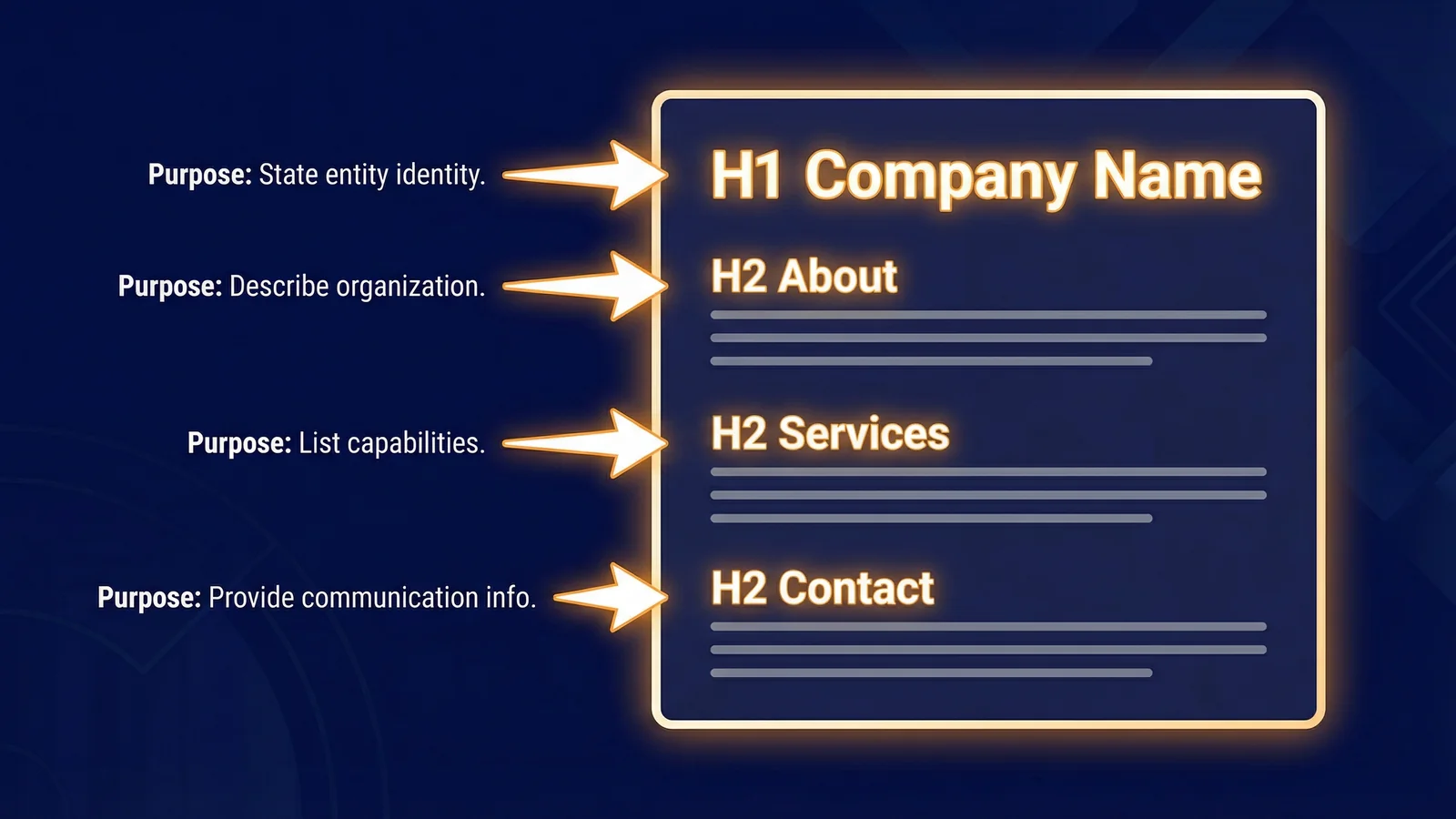
An llms.txt file is a plain text file, written in Markdown, that you place in the root directory of your website. Its purpose is to give AI systems (ChatGPT, Claude, Gemini, Perplexity, and others) a clear, structured summary of who you are, what you do, and how to contact you.
Think of it as a machine-readable business card. When an AI system encounters your website, it can fetch llms.txt to quickly understand your organisation without having to crawl and interpret every page on your site. The format follows the convention documented at llmstxt.org, using Markdown with a specific section hierarchy.
The file is one of ten AI Discovery Files, machine-readable files that help AI systems understand your business accurately. Among those ten, llms.txt is the most widely adopted and the single most important file to implement first. It's designated ADF-001 in the llms.txt specification.
Unlike Schema.org markup, which is embedded within your HTML and tied to specific pages, llms.txt is a standalone file that provides a complete business overview in one place. AI systems can read it in a single request, making it efficient and reliable.
Why your website needs llms.txt
AI systems are already answering questions about your industry, your competitors, and very likely your business. The question isn't whether AI will represent you, but whether it will represent you accurately.
Without an llms.txt file, AI systems must piece together information about your business from whatever they can find: scattered web pages, third-party directories, outdated articles, and cached content. This leads to hallucination, where the AI generates plausible-sounding but incorrect information. It might describe services you don't offer, confuse you with a similarly named company, or present outdated contact details as current.
The consequences are real. A potential client asks ChatGPT about your business and receives wrong information. A researcher cites AI-generated facts about your company that are inaccurate. A prospect is told you offer a service you discontinued three years ago. Each incorrect answer erodes trust, even though you never wrote or approved any of it.
An llms.txt file addresses this by providing authoritative, curated information directly from you. It tells AI systems exactly what your business does, what it doesn't do, and where to find more detail. This is what AI Visibility is really about: ensuring AI systems can discover, interpret, and accurately represent your business. Mark McNeece covers this in depth in our expert Q&A on AI Visibility.
The emphasis on curated matters. An autogenerated llms.txt that is really just your sitemap reformatted as bullet points is the kind of file Google's May 2026 AI Search guide was right to call a waste of time. We unpack what that guide actually said, and what it did not say, in what Google actually said about llms.txt. Write the file yourself, or don't write it at all.
"The problem this solves is that today, constructing the right context for LLMs based on a website is ambiguous. Site authors know best, and can provide a list of content that an LLM should use."
Howard created the llms.txt standard because he saw what we all see: AI systems scraping websites and getting it wrong. The word "ambiguous" is key. Without explicit guidance, an AI model has to guess which parts of your site matter, which are outdated, and which describe your actual business versus a blog post about a competitor. Your homepage was written for humans deciding whether to contact you. llms.txt is the same information rewritten for machines deciding whether to cite you.
Key distinction
AI Visibility Checking validates your infrastructure: whether AI systems can find and read your identity signals. It isn't about tracking what AI says about you. That's AI Visibility Tracking. The llms.txt file is an infrastructure signal. For more on this distinction, read does your website need llms.txt?
The llms.txt file format
The llms.txt file uses Markdown syntax with a defined structure. It isn't freeform; there are required elements and a specific hierarchy that AI systems expect. Understanding this structure before you start writing will save time and produce a better result.
Required elements
Every valid llms.txt file must contain these three elements:
- H1 heading. Your official business or project name. Exactly one, as the first line of content.
- Blockquote summary. A one-to-three sentence description of your business, immediately after the H1 heading. Prefixed with
>on each line. - Contact section. An H2 section (
## Contact) with your contact details: email, phone, address.
Recommended sections
Beyond the required elements, the following H2 sections are strongly recommended:
## Services. A list of your services or products, each with a link and brief description.## What We Do Not Do. Explicit exclusions that prevent AI systems from incorrectly attributing services to you.## Key Information. Links to important pages such as About, Case Studies, and Careers.## AI Discovery Files. Links to your other AI Discovery Files, if you have them.
Link format
Links within sections follow standard Markdown format with an optional description after a colon:
- [Link Text](https://example.com/page): Optional description of the linked pageAnnotated structure overview
Here is the skeleton of a valid llms.txt file with annotations explaining each part:
# Business Name                          <-- H1: exactly one, first line

> One to three sentences describing       <-- Blockquote: required summary
> what the business does and where
> it operates.

Optional body text providing additional   <-- Body: no headings, just context
context about the organisation.

## Services                               <-- H2 section: recommended

- [Service Name](https://...): Brief description
- [Service Name](https://...): Brief description

## What We Do Not Do                      <-- H2 section: recommended

- Exclusion one
- Exclusion two

## Contact                                <-- H2 section: required

- Email: hello@example.com
- Phone: +44 1234 567890
- Address: 123 High Street, London, UK

## Key Information                        <-- H2 section: recommended

- [About Us](https://...): Company background
- [Case Studies](https://...): Client work examples
Tip
Keep your llms.txt factual and concise. Avoid marketing language, superlatives, and unverifiable claims. AI systems respond better to clear, objective statements than to promotional copy. The full format rules are documented in the llms.txt specification.
Step-by-step: Creating your llms.txt
Follow these five steps to create a complete, valid llms.txt file for your website. You will need a plain text editor (Notepad, VS Code, Sublime Text, or similar) and FTP or file manager access to your web server.
Audit your business identity
Before writing anything, gather the facts an AI system needs to accurately represent your business. Open a blank document and answer these questions:
- What is the exact, official name of your business?
- What does your business do, in two or three factual sentences?
- What services or products do you offer? List each one.
- What do you explicitly not do? Think about common misconceptions.
- Where are you based? Where do you operate?
- What is your primary contact email, phone number, and address?
- What are the most important pages on your website?
Be precise. If your trading name differs from your registered company name, note both. If you serve only certain regions, state that clearly. AI systems will take what you write at face value, so accuracy matters more than completeness.
Write the required sections
Create a new file called llms.txt in your text editor. Start with the three required elements:
# Acme Web Design

> Acme Web Design is a web design and development agency based in
> Bristol, United Kingdom. We build custom WordPress websites,
> e-commerce stores, and web applications for small and
> medium-sized businesses across the South West of England.

## Contact

- Email: hello@acmewebdesign.co.uk
- Phone: +44 117 555 0199
- Address: 14 Queen Square, Bristol, BS1 4NT, United Kingdom
The H1 heading must be your official business name, the name you want AI systems to use when referring to you. The blockquote summary should be factual and specific. Mention your location, your industry, and your core offering. The contact section provides the essential details someone (or an AI system) needs to reach you.
Add recommended sections
Now add the sections that make your llms.txt actually useful. The two most valuable are Services and What We Do Not Do.
## Services

- [WordPress Development](https://www.acmewebdesign.co.uk/services/wordpress): Custom theme development, plugin integration, and ongoing maintenance
- [E-commerce](https://www.acmewebdesign.co.uk/services/ecommerce): WooCommerce stores with payment integration and inventory management
- [Web Applications](https://www.acmewebdesign.co.uk/services/web-apps): Bespoke web applications built with modern frameworks
- [SEO](https://www.acmewebdesign.co.uk/services/seo): Technical SEO audits and on-page optimisation

## What We Do Not Do

Acme Web Design does not provide:
- Mobile app development (native iOS or Android)
- Graphic design or print services
- Social media management
- Hosting or domain registration
- Services outside the United Kingdom

## Key Information

- [About Us](https://www.acmewebdesign.co.uk/about): Our team, history, and approach
- [Portfolio](https://www.acmewebdesign.co.uk/portfolio): Recent client projects
- [Blog](https://www.acmewebdesign.co.uk/blog): Web design articles and tutorials
- [Testimonials](https://www.acmewebdesign.co.uk/testimonials): Client feedback
The What We Do Not Do section is particularly important. Without it, AI systems may infer that you offer services you don't. If someone asks an AI "Does Acme Web Design build mobile apps?" and there's no explicit exclusion, the AI might guess yes based on the fact that you build web applications. The exclusion removes that ambiguity.
Each service link should use an absolute URL (starting with https://) and point to the relevant page on your website. The description after the colon should be brief; one line is ideal.
Save and upload to your root domain
Save the file as llms.txt (not llms.txt.txt, which is a common mistake on Windows). Upload it to the root directory of your website using FTP, your hosting file manager, or your deployment pipeline.
Once uploaded, the file must be accessible at:
https://www.yourdomain.com/llms.txtVerify the following:
- The URL returns HTTP status 200 (not 404 or 301)
- The content type is
text/plain(your server should handle this automatically for.txtfiles) - The file is publicly accessible without authentication
- The file isn't blocked by your
robots.txt
Verify it works
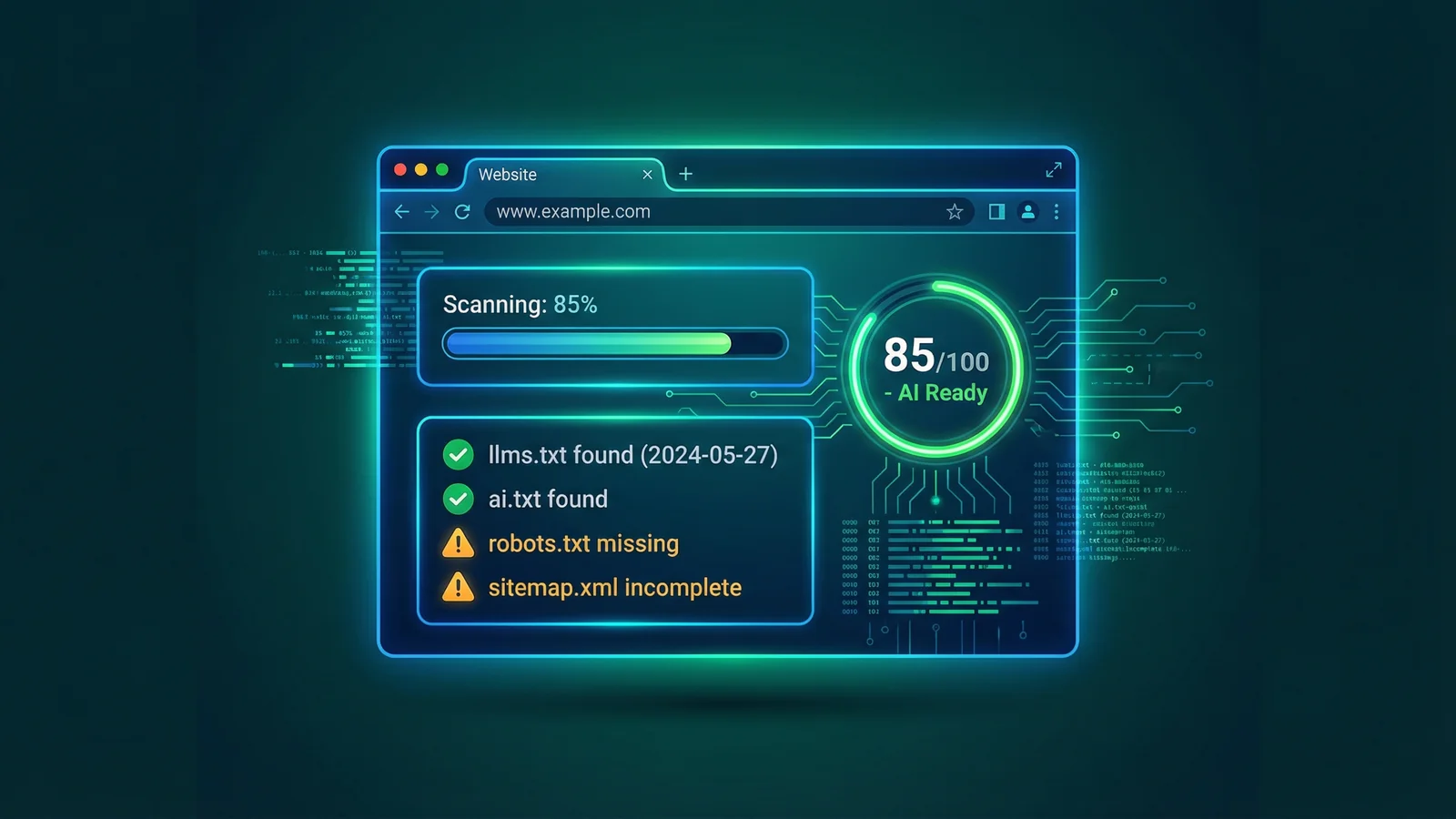
The quickest way to confirm your llms.txt is valid and readable is to run your domain through the AI Visibility Checker. It will detect whether the file exists, validate its format, check for common errors, and score your overall AI readiness.
You can also verify manually by opening your browser and navigating to https://yourdomain.com/llms.txt. You should see the raw Markdown content displayed as plain text. If you see a 404 error, the file isn't in the right location. If you see HTML instead of plain text, your server may be processing the file incorrectly.
Check your AI Visibility now
Run your website through the free AI Visibility Checker to verify your llms.txt and all other AI Discovery Files.
Run the free checkerA complete llms.txt example
Below is a full, realistic llms.txt file for a fictional UK web design agency called Hartley Digital. This example includes all required and recommended sections and can serve as a template for your own file.
# Hartley Digital

> Hartley Digital is a web design and digital marketing agency based
> in Leeds, United Kingdom. We specialise in WordPress development,
> search engine optimisation, and conversion rate optimisation for
> professional services firms and B2B companies across Yorkshire
> and the wider UK.

Hartley Digital (trading name of Hartley Digital Ltd, company number
12345678) was founded in 2018. We work with solicitors, accountants,
financial advisers, and B2B technology companies.

## Services

- [WordPress Design](https://www.hartleydigital.co.uk/services/wordpress-design): Custom WordPress theme design and development
- [WordPress Maintenance](https://www.hartleydigital.co.uk/services/wordpress-maintenance): Monthly updates, security monitoring, and performance optimisation
- [SEO](https://www.hartleydigital.co.uk/services/seo): Technical SEO, content strategy, and local search optimisation
- [Conversion Rate Optimisation](https://www.hartleydigital.co.uk/services/cro): A/B testing, user research, and landing page optimisation
- [Content Marketing](https://www.hartleydigital.co.uk/services/content): Blog management, copywriting, and content strategy

## What We Do Not Do

Hartley Digital does not provide:
- Mobile app development (native or hybrid)
- Social media management or community management
- Pay-per-click advertising management
- Graphic design, branding, or print design
- Web hosting, domain registration, or email hosting
- Services outside the United Kingdom

## Contact

- General enquiries: hello@hartleydigital.co.uk
- New projects: projects@hartleydigital.co.uk
- Phone: +44 113 555 0234
- Address: 7 Park Row, Leeds, LS1 5HD, United Kingdom

## Key Information

- [About Us](https://www.hartleydigital.co.uk/about): Our story, team, and values
- [Case Studies](https://www.hartleydigital.co.uk/case-studies): Examples of client projects and results
- [Blog](https://www.hartleydigital.co.uk/blog): Articles on web design, SEO, and digital marketing
- [Careers](https://www.hartleydigital.co.uk/careers): Current vacancies and how to apply
- [Privacy Policy](https://www.hartleydigital.co.uk/privacy): How we handle personal data

## AI Discovery Files

- [AI Guidance](https://www.hartleydigital.co.uk/ai.txt): Permissions and usage guidance for AI systems
- [Brand Guidelines](https://www.hartleydigital.co.uk/brand.txt): How to reference our brand correctly
- [FAQ for AI](https://www.hartleydigital.co.uk/faq-ai.txt): Common questions answered in AI-readable format
- [Identity Data](https://www.hartleydigital.co.uk/identity.json): Structured business identity in JSON format
Ready to use
You can copy this example and adapt it for your own business. Replace the business name, description, services, contact details, and URLs with your own information. Keep the structure and section headings intact.
Common mistakes to avoid
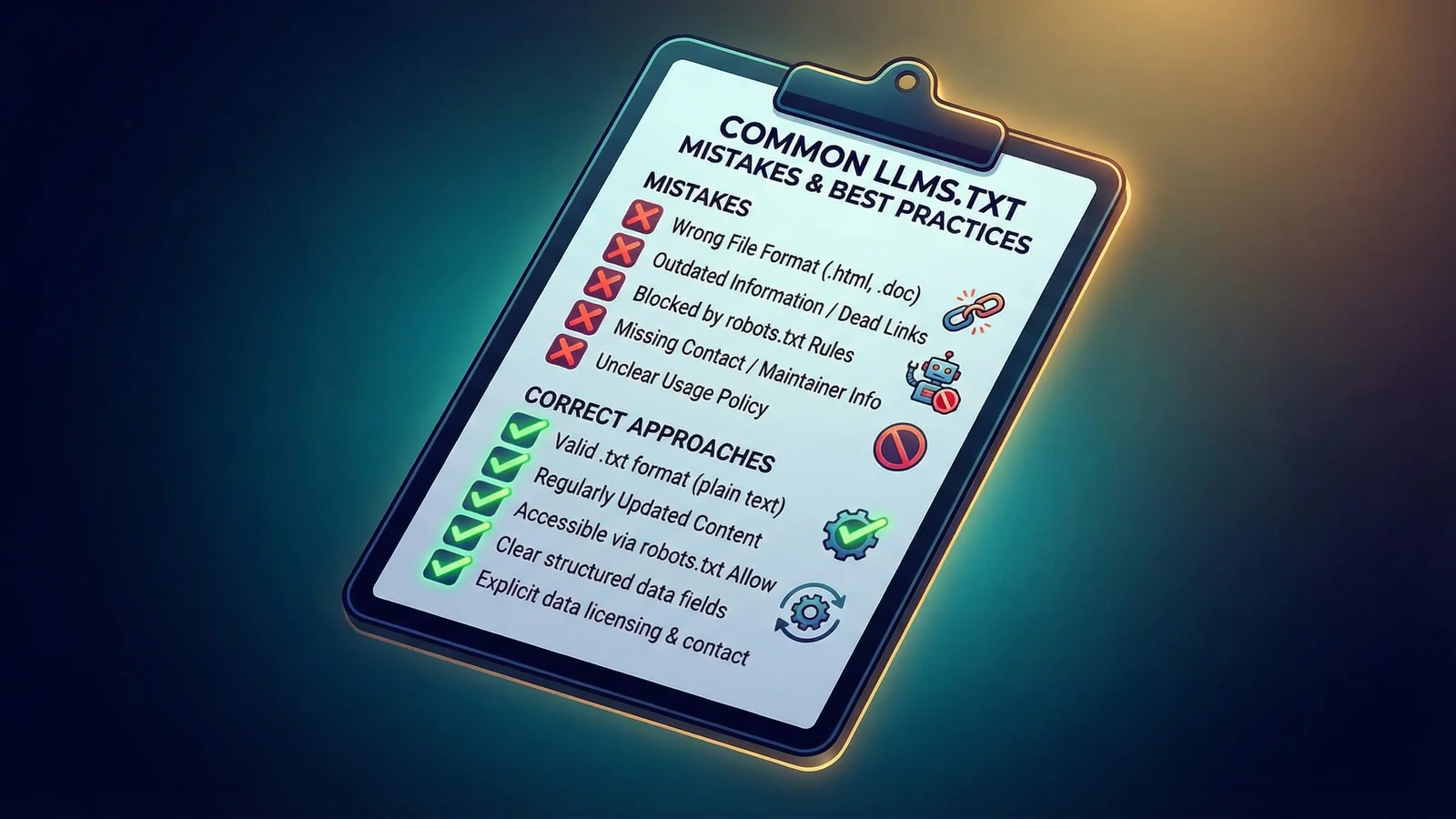
These are the errors we see most frequently when reviewing llms.txt files. Each one reduces the effectiveness of the file or may cause AI systems to ignore it entirely.
-
Using the wrong file format. The file must be plain text with a
.txtextension, written in Markdown. Don't save it as.md,.html, or.doc. Don't include HTML tags within the file. Some text editors add hidden formatting, so always use a plain text editor. -
Writing marketing copy instead of facts. Phrases like "industry-leading", "award-winning", and "best-in-class" don't belong in
llms.txt. AI systems respond to factual, verifiable statements. State what you do, where you operate, and how to reach you. Save the marketing language for your website. -
Using relative URLs. Every link in your
llms.txtmust be an absolute URL starting withhttps://. Relative URLs like/services/seocan't be resolved by AI systems that fetch the file independently of your website. - Omitting the "What We Do Not Do" section. This is one of the most valuable sections in the file. Without explicit exclusions, AI systems will guess, and they'll often guess incorrectly. If you're a web design agency, state clearly that you don't build mobile apps, if that's the case.
-
Letting the file go stale. An
llms.txtfile with outdated services, a discontinued phone number, or a former office address is worse than no file at all. Review and update it at least once per quarter, and immediately after any major business change. -
Blocking the file in robots.txt. If your
robots.txtincludes a broadDisallowrule, it may prevent AI crawlers from accessingllms.txt. Check that the file isn't inadvertently blocked. AI crawlers such as GPTBot, ClaudeBot, and PerplexityBot respectrobots.txtdirectives. -
Inconsistent naming across files. If your
llms.txtsays "Acme Web Design" but youridentity.jsonsays "Acme Digital" and your Schema.org markup says "ACME Ltd", AI systems can't confidently determine which name is correct. Use the same business name everywhere. -
Missing the contact section entirely. The
## Contactsection is required, not optional. A file without contact information is technically invalid according to the llms.txt specification and far less useful to AI systems trying to provide complete answers about your business.
Testing your llms.txt
Once your file is uploaded, you can confirm it's working correctly in a few ways.
Manual browser check
Open your web browser and go to https://yourdomain.com/llms.txt. You should see your Markdown content displayed as plain text. Check that the encoding is correct (no garbled characters), the H1 heading appears on the first content line, and all links are clickable and resolve to the correct pages.
AI Visibility Checker
The AI Visibility Checker provides an automated assessment of your llms.txt file alongside all other AI Discovery Files. It validates the file format, checks for common errors, verifies that links are accessible, and scores your overall AI readiness out of 10. This is the fastest way to get a thorough validation.
Google PageSpeed Insights
As of May 2026, Google's own Lighthouse checks for a valid llms.txt as part of a new Agentic Browsing category in PageSpeed Insights. Run your URL through it and a well-formed file helps turn that check green. We explain the whole category, and the two other things it scores, in Agentic Browsing: Google now scores your site for AI agents.
Ask AI systems directly
After your file has been live for a period (AI systems don't fetch files in real time for every query; they rely on periodic crawling), you can test by asking AI systems questions about your business. Try prompts such as:
- "What does [your business name] do?"
- "Where is [your business name] based?"
- "Does [your business name] offer [a service you don't provide]?"
If the AI gives accurate, specific answers that align with your llms.txt content, the file is doing its job. If the answers are vague, wrong, or missing key information, review your file for completeness and clarity.
"I have a dream for the Web in which computers become capable of analyzing all the data on the Web. A 'Semantic Web', which makes this possible, has yet to emerge, but when it does, the day-to-day mechanisms of trade, bureaucracy and our daily lives will be handled by machines talking to machines."
Berners-Lee wrote this in 1999. Twenty-seven years later, we're finally living in the world he described, just not quite the way he imagined. The Semantic Web vision assumed structured data standards would emerge top-down. What actually happened is that AI systems learned to read messy, unstructured content and started making decisions based on it. llms.txt is a pragmatic response: rather than waiting for the entire web to become machine-readable, you make your own corner of it machine-readable right now. One file, your root directory, your terms.
Verify your llms.txt now
The AI Visibility Checker validates your llms.txt format, checks for errors, and scores your AI readiness. Free, instant results.
Check your websiteWordPress shortcut
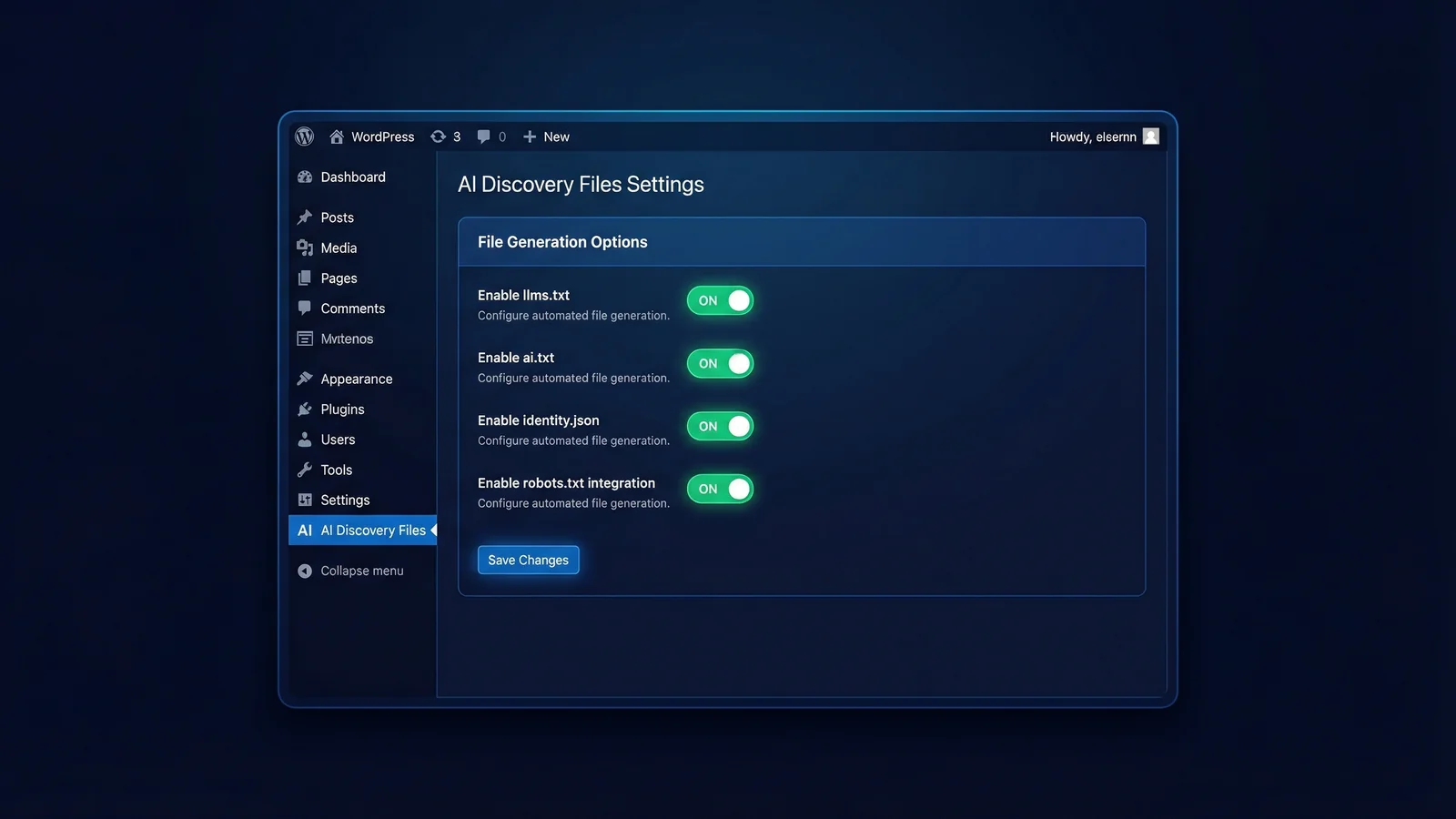
If your website runs on WordPress, you don't need to create llms.txt manually. The AI Discovery Files plugin generates and manages all ten AI Discovery Files directly from your WordPress dashboard, including llms.txt.
It will also tell you whether the file you have just published is being read. We wrote up 30 days of AI crawler logs from a real WordPress site, including which bots called for llms.txt and which came for the other nine files instead.
The plugin includes a guided setup wizard that walks you through entering your business information. It then generates your llms.txt in the correct format, serves it at the right URL, and keeps it in sync with your other AI Discovery Files. There's no need to use FTP, edit text files, or worry about formatting.
The plugin also handles the more complex files (identity.json, ai.json, and others) that are harder to create manually. It's free, available from the WordPress.org plugin directory, and takes about five minutes to set up. If you want to implement all ten files rather than just llms.txt, the plugin is the most efficient way to do it.
For a broader understanding of how all ten files work together, see the quick start guide.
If you would rather not maintain this by hand at all, our done-for-you setup pack researches, writes and deploys the whole set of ten files for your business.
Frequently asked questions
Where do I put my llms.txt file?
Place the file in the root directory of your website so it's accessible at https://yourdomain.com/llms.txt. This is the same directory where your homepage (index.html or index.php) lives. Don't put it in a subdirectory, a /files/ folder, or behind a content management system route. AI systems look for it at the root URL only.
How long should llms.txt be?
Aim for under 100 lines. The file should be a concise summary, not full documentation of your entire business. Include enough for AI systems to accurately represent you: your name, what you do, what you don't do, how to reach you, and links to key pages for further detail. Most effective llms.txt files are between 40 and 80 lines long.
Do I need llms.txt if I have Schema.org markup?
Yes. Schema.org markup and llms.txt serve different purposes and are consumed in different ways. Schema.org is embedded in your HTML, tied to specific pages, and structured for search engines. An llms.txt file is a standalone document that provides a complete business overview optimised for AI language models. AI systems like ChatGPT and Claude can fetch llms.txt in a single request without parsing any HTML. The two are complementary, not interchangeable.
How often should I update llms.txt?
Review your llms.txt at least once per quarter to confirm all information is still accurate. Update it immediately whenever your services change, your contact details change, your geographic scope changes, or you rebrand. An outdated file is worse than no file at all, because AI systems will present stale information as current fact.
Can llms.txt hurt my SEO?
No. The llms.txt file is a plain text file that search engine crawlers can read but don't use for ranking purposes. It doesn't affect your Google rankings, your page speed scores, or any other SEO metric. It exists solely for AI systems. If anything, having a well-structured llms.txt file is a positive signal; it shows that your website is well-maintained and AI-ready.
Is llms.txt the same as robots.txt?
No. They're entirely different files with different purposes. robots.txt tells web crawlers which parts of your site they may or may not access. llms.txt tells AI systems who you are, what you do, and how to represent you accurately. Think of robots.txt as access control and llms.txt as identity information. Both are plain text files in your website root, but they serve unrelated functions.